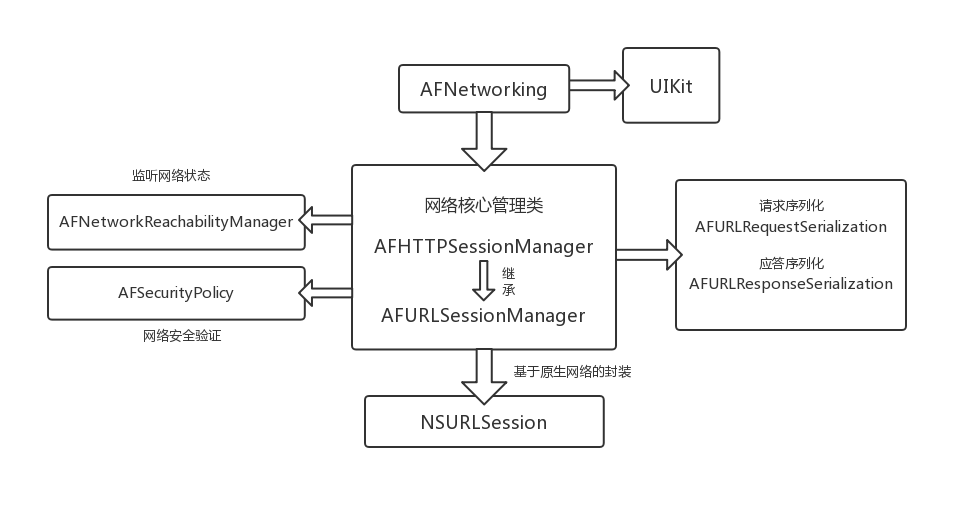
AFNetworking是iOS开发中常用的一个第三方网络库,可以说它是目前最流行的网络库,但其代码结构其实并不复杂,也可以说非常简洁优美。在AFNetworking中,大量使用的线程安全的开发技巧,读此源码也是一次很好的多线程学习机会。本篇博客从主要结构和网络请求的主流程进行分享,解析了AFNetworking的设计思路与工作原理,后面还有其中提供的UI扩展包的接口应用总结。
一、 架构组成 AFNetworking可以分为五个模块:
网络通信模块(AFURLSessionManager、AFHTTPSessionManger)
网络状态监听模块(Reachability)
网络通信安全策略模块(Security)
网络通信信息序列化/反序列化模块(Serialization)
对于iOS UIKit库的扩展(UIKit)
对于AFNetworking框架的核心,无非AFURLSesstionManager类,这个类是基于系统的NSURLSesstion会话类进行的管理者包装,下图是AF框架一个整体的结构。
二、 核心类解析 1、网络通信模块 1.1 AFURLSesstionManager 1.1.1 初始化方法 1 2 3 4 5 6 7 8 9 10 11 12 13 14 15 16 17 18 19 20 21 22 23 24 25 26 27 28 29 30 31 32 33 34 35 36 37 38 39 40 41 42 43 44 45 46 47 48 49 50 51 52 53 54 - (instancetype)initWithSessionConfiguration:(NSURLSessionConfiguration *)configuration { self = [super init]; if (!self) { return nil; } if (!configuration) { //使用默认配置 configuration = [NSURLSessionConfiguration defaultSessionConfiguration]; } self.sessionConfiguration = configuration; //queue并发线程数设置为1 self.operationQueue = [[NSOperationQueue alloc] init]; self.operationQueue.maxConcurrentOperationCount = 1; //创建session会话 self.session = [NSURLSession sessionWithConfiguration:self.sessionConfiguration delegate:self delegateQueue:self.operationQueue]; //默认将返回数据按照json进行解析 self.responseSerializer = [AFJSONResponseSerializer serializer]; //设置安全验证 self.securityPolicy = [AFSecurityPolicy defaultPolicy]; #if !TARGET_OS_WATCH //设置网络状态监听 self.reachabilityManager = [AFNetworkReachabilityManager sharedManager]; #endif // 设置存储NSURL task与AFURLSessionManagerTaskDelegate的词典(重点,在AF中,每一个task都会被匹配一个AFURLSessionManagerTaskDelegate 来做task的delegate事件处理) self.mutableTaskDelegatesKeyedByTaskIdentifier = [[NSMutableDictionary alloc] init]; //初始化锁 self.lock = [[NSLock alloc] init]; self.lock.name = AFURLSessionManagerLockName; //下面的做法是为了防止 被修改了sesstion的系统实现有初始任务 [self.session getTasksWithCompletionHandler:^(NSArray *dataTasks, NSArray *uploadTasks, NSArray *downloadTasks) { for (NSURLSessionDataTask *task in dataTasks) { [self addDelegateForDataTask:task uploadProgress:nil downloadProgress:nil completionHandler:nil]; } for (NSURLSessionUploadTask *uploadTask in uploadTasks) { [self addDelegateForUploadTask:uploadTask progress:nil completionHandler:nil]; } for (NSURLSessionDownloadTask *downloadTask in downloadTasks) { [self addDelegateForDownloadTask:downloadTask progress:nil destination:nil completionHandler:nil]; } }]; return self; }
这里有一个需要注意的地方就是 self.operationQueue.maxConcurrentOperationCount = 1;
NSURLConnention 的一个弊端就是:在发起请求之后,这条线程并不能释放,而是需要一直处于保活状态去等待回调。NSURLSession就是为了替代NSURLConnection而出现的,NSURLSession的其他优点这里不作赘述。
1 2 3 4 5 //queue并发线程数设置为1 self.operationQueue = [[NSOperationQueue alloc] init]; self.operationQueue.maxConcurrentOperationCount = 1; //创建session会话 self.session = [NSURLSession sessionWithConfiguration:self.sessionConfiguration delegate:self delegateQueue:self.operationQueue];
从上述代码中我们可以看出NSURLSession不在需要在当前线程进行代理方法的回调,可以指定回调的delegateQueue,区别于AF2.x,我们不在需要为了等待代理回调去保活线程。
同时也需要注意这里设置的 maxConcurrentOperationCount 为1,主要是想让并发的请求进行串行回调。
1 2 3 4 5 6 7 8 9 - (AFURLSessionManagerTaskDelegate *)delegateForTask:(NSURLSessionTask *)task { NSParameterAssert(task); AFURLSessionManagerTaskDelegate *delegate = nil; [self.lock lock]; //给所要访问的资源加锁,防止造成数据混乱 delegate = self.mutableTaskDelegatesKeyedByTaskIdentifier[@(task.taskIdentifier)]; [self.lock unlock]; return delegate; }
这边对 self.mutableTaskDelegatesKeyedByTaskIdentifier 的访问进行了加锁,目的是保证多线程环境下的数据安全。既然加了锁,就算maxConcurrentOperationCount不设为1,当某个请求正在回调时,下一个请求还是得等待一直到上个请求获取完所要的资源后解锁,所以这边并发回调也是没有意义的。相反多task回调导致的多线程并发,还会导致性能的浪费。
1.1.2 创建请求 AFURLSesstionManager创建的请求任务有三类,分别对应了NSURLSession中的NSURLSessionDataTask,NSURLSessionUploadTask以及NSURLSessionDownloadTask。
以数据请求为例:
1 2 3 4 5 6 7 8 9 10 11 12 13 14 15 16 17 18 19 20 21 22 23 24 25 26 27 28 29 30 31 32 33 - (NSURLSessionDataTask *)dataTaskWithRequest:(NSURLRequest *)request uploadProgress:(nullable void (^)(NSProgress *uploadProgress)) uploadProgressBlock downloadProgress:(nullable void (^)(NSProgress *downloadProgress)) downloadProgressBlock completionHandler:(nullable void (^)(NSURLResponse *response, id _Nullable responseObject, NSError * _Nullable error))completionHandler { __block NSURLSessionDataTask *dataTask = nil; url_session_manager_create_task_safely(^{ //创建任务 dataTask = [self.session dataTaskWithRequest:request]; }); //进行代理设置 [self addDelegateForDataTask:dataTask uploadProgress:uploadProgressBlock downloadProgress:downloadProgressBlock completionHandler:completionHandler]; return dataTask; } //对代理进行设置 - (void)addDelegateForDataTask:(NSURLSessionDataTask *)dataTask uploadProgress:(nullable void (^)(NSProgress *uploadProgress)) uploadProgressBlock downloadProgress:(nullable void (^)(NSProgress *downloadProgress)) downloadProgressBlock completionHandler:(void (^)(NSURLResponse *response, id responseObject, NSError *error))completionHandler { //创建内部代理 AFURLSessionManagerTaskDelegate *delegate = [[AFURLSessionManagerTaskDelegate alloc] init]; delegate.manager = self; delegate.completionHandler = completionHandler; dataTask.taskDescription = self.taskDescriptionForSessionTasks; //设置代理 [self setDelegate:delegate forTask:dataTask]; delegate.uploadProgressBlock = uploadProgressBlock; delegate.downloadProgressBlock = downloadProgressBlock; }
这里的NSURLSesstionTask代理其实还是AFURLSesstionManager本身,manager收到回调之后会自己处理一些回调,与开发者相关的回调会转给AFURLSessionManagerTaskDelegate处理。
1 2 3 4 5 6 7 8 9 10 11 12 13 14 15 16 17 18 19 20 21 22 23 24 25 26 27 28 29 30 31 32 33 34 35 36 37 38 39 40 41 42 43 44 45 46 47 48 49 50 51 52 53 54 55 56 57 58 59 60 61 62 63 64 65 66 67 68 69 70 71 72 73 74 75 76 77 78 79 80 81 82 83 84 85 86 87 88 89 90 91 92 93 94 95 96 97 98 99 100 101 102 103 104 105 106 107 108 109 110 111 112 113 114 115 116 117 118 119 120 121 122 123 124 125 126 127 128 129 130 131 132 133 134 135 136 137 138 139 140 141 142 143 144 145 146 147 148 149 150 151 152 153 154 155 156 157 158 159 160 161 162 163 164 165 166 167 168 169 170 171 172 173 174 175 176 177 178 179 180 181 182 183 184 185 186 //接收到URL重定向时回调 - (void)URLSession:(NSURLSession *)session task:(NSURLSessionTask *)task willPerformHTTPRedirection:(NSHTTPURLResponse *)response newRequest:(NSURLRequest *)request completionHandler:(void (^)(NSURLRequest *))completionHandler { NSURLRequest *redirectRequest = request; //这里会执行用户自定义的重定向block if (self.taskWillPerformHTTPRedirection) { redirectRequest = self.taskWillPerformHTTPRedirection(session, task, response, request); } //继续重定向后的请求 if (completionHandler) { completionHandler(redirectRequest); } } //接收到安全认证挑战的回调 - (void)URLSession:(NSURLSession *)session task:(NSURLSessionTask *)task didReceiveChallenge:(NSURLAuthenticationChallenge *)challenge completionHandler:(void (^)(NSURLSessionAuthChallengeDisposition disposition, NSURLCredential *credential))completionHandler { NSURLSessionAuthChallengeDisposition disposition = NSURLSessionAuthChallengePerformDefaultHandling; __block NSURLCredential *credential = nil; //如果开发者有提供block 交开发者处理 否则用默认的安全验证方案处理 if (self.taskDidReceiveAuthenticationChallenge) { disposition = self.taskDidReceiveAuthenticationChallenge(session, task, challenge, &credential); } else { if ([challenge.protectionSpace.authenticationMethod isEqualToString:NSURLAuthenticationMethodServerTrust]) { if ([self.securityPolicy evaluateServerTrust:challenge.protectionSpace.serverTrust forDomain:challenge.protectionSpace.host]) { disposition = NSURLSessionAuthChallengeUseCredential; credential = [NSURLCredential credentialForTrust:challenge.protectionSpace.serverTrust]; } else { disposition = NSURLSessionAuthChallengeCancelAuthenticationChallenge; } } else { disposition = NSURLSessionAuthChallengePerformDefaultHandling; } } if (completionHandler) { completionHandler(disposition, credential); } } //需要提供数据流传向服务器时调用 - (void)URLSession:(NSURLSession *)session task:(NSURLSessionTask *)task needNewBodyStream:(void (^)(NSInputStream *bodyStream))completionHandler { NSInputStream *inputStream = nil; if (self.taskNeedNewBodyStream) { inputStream = self.taskNeedNewBodyStream(session, task); } else if (task.originalRequest.HTTPBodyStream && [task.originalRequest.HTTPBodyStream conformsToProtocol:@protocol(NSCopying)]) { inputStream = [task.originalRequest.HTTPBodyStream copy]; } if (completionHandler) { completionHandler(inputStream); } } //已经发送数据后调用 - (void)URLSession:(NSURLSession *)session task:(NSURLSessionTask *)task didSendBodyData:(int64_t)bytesSent totalBytesSent:(int64_t)totalBytesSent totalBytesExpectedToSend:(int64_t)totalBytesExpectedToSend { int64_t totalUnitCount = totalBytesExpectedToSend; if(totalUnitCount == NSURLSessionTransferSizeUnknown) { NSString *contentLength = [task.originalRequest valueForHTTPHeaderField:@"Content-Length"]; if(contentLength) { totalUnitCount = (int64_t) [contentLength longLongValue]; } } if (self.taskDidSendBodyData) { self.taskDidSendBodyData(session, task, bytesSent, totalBytesSent, totalUnitCount); } } //请求任务完成时回调 - (void)URLSession:(NSURLSession *)session task:(NSURLSessionTask *)task didCompleteWithError:(NSError *)error { //拿到内部代理 交给它处理 AFURLSessionManagerTaskDelegate *delegate = [self delegateForTask:task]; // delegate may be nil when completing a task in the background if (delegate) { [delegate URLSession:session task:task didCompleteWithError:error]; [self removeDelegateForTask:task]; } if (self.taskDidComplete) { self.taskDidComplete(session, task, error); } } //接收到返回数据时回调 - (void)URLSession:(NSURLSession *)session dataTask:(NSURLSessionDataTask *)dataTask didReceiveResponse:(NSURLResponse *)response completionHandler:(void (^)(NSURLSessionResponseDisposition disposition))completionHandler { NSURLSessionResponseDisposition disposition = NSURLSessionResponseAllow; if (self.dataTaskDidReceiveResponse) { disposition = self.dataTaskDidReceiveResponse(session, dataTask, response); } if (completionHandler) { completionHandler(disposition); } } //此请求将要变更成下载任务时回调 - (void)URLSession:(NSURLSession *)session dataTask:(NSURLSessionDataTask *)dataTask didBecomeDownloadTask:(NSURLSessionDownloadTask *)downloadTask { //重新设置内部代理 AFURLSessionManagerTaskDelegate *delegate = [self delegateForTask:dataTask]; if (delegate) { [self removeDelegateForTask:dataTask]; [self setDelegate:delegate forTask:downloadTask]; } if (self.dataTaskDidBecomeDownloadTask) { self.dataTaskDidBecomeDownloadTask(session, dataTask, downloadTask); } } //开始获取数据时调用 - (void)URLSession:(NSURLSession *)session dataTask:(NSURLSessionDataTask *)dataTask didReceiveData:(NSData *)data { //交给内部代理处理 AFURLSessionManagerTaskDelegate *delegate = [self delegateForTask:dataTask]; [delegate URLSession:session dataTask:dataTask didReceiveData:data]; if (self.dataTaskDidReceiveData) { self.dataTaskDidReceiveData(session, dataTask, data); } } //将要缓存回执数据时调用 - (void)URLSession:(NSURLSession *)session dataTask:(NSURLSessionDataTask *)dataTask willCacheResponse:(NSCachedURLResponse *)proposedResponse completionHandler:(void (^)(NSCachedURLResponse *cachedResponse))completionHandler { NSCachedURLResponse *cachedResponse = proposedResponse; if (self.dataTaskWillCacheResponse) { cachedResponse = self.dataTaskWillCacheResponse(session, dataTask, proposedResponse); } if (completionHandler) { completionHandler(cachedResponse); } } //下载任务结束后回调 - (void)URLSession:(NSURLSession *)session downloadTask:(NSURLSessionDownloadTask *)downloadTask didFinishDownloadingToURL:(NSURL *)location { AFURLSessionManagerTaskDelegate *delegate = [self delegateForTask:downloadTask]; if (self.downloadTaskDidFinishDownloading) { NSURL *fileURL = self.downloadTaskDidFinishDownloading(session, downloadTask, location); if (fileURL) { delegate.downloadFileURL = fileURL; NSError *error = nil; //数据位置移动 [[NSFileManager defaultManager] moveItemAtURL:location toURL:fileURL error:&error]; if (error) { [[NSNotificationCenter defaultCenter] postNotificationName:AFURLSessionDownloadTaskDidFailToMoveFileNotification object:downloadTask userInfo:error.userInfo]; } return; } } //内部代理进行后续处理 if (delegate) { [delegate URLSession:session downloadTask:downloadTask didFinishDownloadingToURL:location]; } }
AFURLSesstionManagerTaskDelegate是一个内部类,主要用来处理AFURLSesstionManager转过来的一些网络回调,请求进度的控制。
1 2 3 4 5 6 7 8 9 10 11 12 13 14 15 16 17 18 19 20 21 22 23 24 25 26 27 28 29 30 31 32 33 34 35 36 37 38 39 40 41 42 43 44 45 46 47 48 49 50 51 52 53 54 55 56 57 58 59 60 61 62 63 64 65 66 67 68 69 70 71 72 73 74 75 76 77 78 79 80 81 82 83 84 85 86 87 88 89 90 91 92 93 94 95 //接收到数据后 将数据进行拼接 - (void)URLSession:(__unused NSURLSession *)session dataTask:(__unused NSURLSessionDataTask *)dataTask didReceiveData:(NSData *)data { [self.mutableData appendData:data]; } //请求完成后 - (void)URLSession:(__unused NSURLSession *)session task:(NSURLSessionTask *)task didCompleteWithError:(NSError *)error { #pragma clang diagnostic push #pragma clang diagnostic ignored "-Wgnu" __strong AFURLSessionManager *manager = self.manager; __block id responseObject = nil; //配置一个信息字典 __block NSMutableDictionary *userInfo = [NSMutableDictionary dictionary]; userInfo[AFNetworkingTaskDidCompleteResponseSerializerKey] = manager.responseSerializer; //拿到请求结果数据 NSData *data = nil; if (self.mutableData) { data = [self.mutableData copy]; //We no longer need the reference, so nil it out to gain back some memory. self.mutableData = nil; } //下载信息配置 if (self.downloadFileURL) { userInfo[AFNetworkingTaskDidCompleteAssetPathKey] = self.downloadFileURL; } else if (data) { userInfo[AFNetworkingTaskDidCompleteResponseDataKey] = data; } //错误信息配置 if (error) { userInfo[AFNetworkingTaskDidCompleteErrorKey] = error; dispatch_group_async(manager.completionGroup ?: url_session_manager_completion_group(), manager.completionQueue ?: dispatch_get_main_queue(), ^{ if (self.completionHandler) { self.completionHandler(task.response, responseObject, error); } dispatch_async(dispatch_get_main_queue(), ^{ [[NSNotificationCenter defaultCenter] postNotificationName:AFNetworkingTaskDidCompleteNotification object:task userInfo:userInfo]; }); }); } else { dispatch_async(url_session_manager_processing_queue(), ^{ NSError *serializationError = nil; //用回执数据序列化类进行数据处理 responseObject = [manager.responseSerializer responseObjectForResponse:task.response data:data error:&serializationError]; if (self.downloadFileURL) { responseObject = self.downloadFileURL; } if (responseObject) { userInfo[AFNetworkingTaskDidCompleteSerializedResponseKey] = responseObject; } if (serializationError) { userInfo[AFNetworkingTaskDidCompleteErrorKey] = serializationError; } dispatch_group_async(manager.completionGroup ?: url_session_manager_completion_group(), manager.completionQueue ?: dispatch_get_main_queue(), ^{ if (self.completionHandler) { self.completionHandler(task.response, responseObject, serializationError); } dispatch_async(dispatch_get_main_queue(), ^{ [[NSNotificationCenter defaultCenter] postNotificationName:AFNetworkingTaskDidCompleteNotification object:task userInfo:userInfo]; }); }); }); } } //下载处理 - (void)URLSession:(NSURLSession *)session downloadTask:(NSURLSessionDownloadTask *)downloadTask didFinishDownloadingToURL:(NSURL *)location { NSError *fileManagerError = nil; self.downloadFileURL = nil; if (self.downloadTaskDidFinishDownloading) { self.downloadFileURL = self.downloadTaskDidFinishDownloading(session, downloadTask, location); if (self.downloadFileURL) { [[NSFileManager defaultManager] moveItemAtURL:location toURL:self.downloadFileURL error:&fileManagerError]; if (fileManagerError) { [[NSNotificationCenter defaultCenter] postNotificationName:AFURLSessionDownloadTaskDidFailToMoveFileNotification object:downloadTask userInfo:fileManagerError.userInfo]; } } } }
1.2 AFHTTPSessionManager AFHTTPSessionManager主要是对AFURLSessionManager的封装,是开发人员经常调用的一个类。
1 2 3 4 5 6 7 8 9 10 11 12 13 14 15 16 17 18 19 20 21 22 23 24 25 26 27 28 29 30 31 32 33 34 35 36 37 38 39 40 41 42 43 44 45 46 47 48 49 50 51 52 53 54 55 56 57 58 59 60 61 62 63 64 65 66 67 68 69 70 71 72 73 @interface AFHTTPSessionManager : AFURLSessionManager <NSSecureCoding, NSCopying //基础URL @property (readonly, nonatomic, strong, nullable) NSURL *baseURL; //请求序列化对象 @property (nonatomic, strong) AFHTTPRequestSerializer <AFURLRequestSerialization> * requestSerializer; //回执序列化对象 @property (nonatomic, strong) AFHTTPResponseSerializer <AFURLResponseSerialization> * responseSerializer; //创建一个默认的Manager实例 注意不是单例 + (instancetype)manager; //初始化方法 - (instancetype)initWithBaseURL:(nullable NSURL *)url; - (instancetype)initWithBaseURL:(nullable NSURL *)url sessionConfiguration:(nullable NSURLSessionConfiguration *)configuration NS_DESIGNATED_INITIALIZER; //进行get请求 - (nullable NSURLSessionDataTask *)GET:(NSString *)URLString parameters:(nullable id)parameters success:(nullable void (^)(NSURLSessionDataTask *task, id _Nullable responseObject))success failure:(nullable void (^)(NSURLSessionDataTask * _Nullable task, NSError *error))failure DEPRECATED_ATTRIBUTE; - (nullable NSURLSessionDataTask *)GET:(NSString *)URLString parameters:(nullable id)parameters progress:(nullable void (^)(NSProgress *downloadProgress))downloadProgress success:(nullable void (^)(NSURLSessionDataTask *task, id _Nullable responseObject))success failure:(nullable void (^)(NSURLSessionDataTask * _Nullable task, NSError *error))failure; //进行HEAD请求 - (nullable NSURLSessionDataTask *)HEAD:(NSString *)URLString parameters:(nullable id)parameters success:(nullable void (^)(NSURLSessionDataTask *task))success failure:(nullable void (^)(NSURLSessionDataTask * _Nullable task, NSError *error))failure; //进行POST请求 - (nullable NSURLSessionDataTask *)POST:(NSString *)URLString parameters:(nullable id)parameters success:(nullable void (^)(NSURLSessionDataTask *task, id _Nullable responseObject))success failure:(nullable void (^)(NSURLSessionDataTask * _Nullable task, NSError *error))failure DEPRECATED_ATTRIBUTE; - (nullable NSURLSessionDataTask *)POST:(NSString *)URLString parameters:(nullable id)parameters progress:(nullable void (^)(NSProgress *uploadProgress))uploadProgress success:(nullable void (^)(NSURLSessionDataTask *task, id _Nullable responseObject))success failure:(nullable void (^)(NSURLSessionDataTask * _Nullable task, NSError *error))failure; - (nullable NSURLSessionDataTask *)POST:(NSString *)URLString parameters:(nullable id)parameters constructingBodyWithBlock:(nullable void (^)(id <AFMultipartFormData> formData))block success:(nullable void (^)(NSURLSessionDataTask *task, id _Nullable responseObject))success failure:(nullable void (^)(NSURLSessionDataTask * _Nullable task, NSError *error))failure DEPRECATED_ATTRIBUTE; - (nullable NSURLSessionDataTask *)POST:(NSString *)URLString parameters:(nullable id)parameters constructingBodyWithBlock:(nullable void (^)(id <AFMultipartFormData> formData))block progress:(nullable void (^)(NSProgress *uploadProgress))uploadProgress success:(nullable void (^)(NSURLSessionDataTask *task, id _Nullable responseObject))success failure:(nullable void (^)(NSURLSessionDataTask * _Nullable task, NSError *error))failure; //进行PUT请求 - (nullable NSURLSessionDataTask *)PUT:(NSString *)URLString parameters:(nullable id)parameters success:(nullable void (^)(NSURLSessionDataTask *task, id _Nullable responseObject))success failure:(nullable void (^)(NSURLSessionDataTask * _Nullable task, NSError *error))failure; //进行PATCH请求 - (nullable NSURLSessionDataTask *)PATCH:(NSString *)URLString parameters:(nullable id)parameters success:(nullable void (^)(NSURLSessionDataTask *task, id _Nullable responseObject))success failure:(nullable void (^)(NSURLSessionDataTask * _Nullable task, NSError *error))failure; //进行DELETE请求 - (nullable NSURLSessionDataTask *)DELETE:(NSString *)URLString parameters:(nullable id)parameters success:(nullable void (^)(NSURLSessionDataTask *task, id _Nullable responseObject))success failure:(nullable void (^)(NSURLSessionDataTask * _Nullable task, NSError *error))failure;
2、序列化 AFNetworking中的序列化是两个协议,他们的作用其实就是对请求进行配置以及对返回数据进行解析。
2.1 AFURLRequestSerialization 实现这个接口的类主要是AFHTTPRequestSerizlizaer类,其还有两个子类,分别为AFJSONRequestSerizlizaer和AFPropertyListRequestSerializer类。
1 2 3 4 5 @protocol AFURLResponseSerialization <NSObject, NSSecureCoding, NSCopying> //将请求和参数进行配置后返回 - (nullable id)responseObjectForResponse:(nullable NSURLResponse *)response data:(nullable NSData *)data error:(NSError * _Nullable __autoreleasing *)error NS_SWIFT_NOTHROW;
AFHTTPRequestSerizlizaer在请求的时候会对请求的head进行配置,他默认会向请求头中添加Accept-Language,User-Agent以及其他可配置的头部信息(缓存,Cookie,超时时间,用户名密码等)。在进行请求参数配置的时候,AFHTTPRequestSerizlizaer会根据请求方法来选择配置到url后面或者添加到请求body中(HEAD,DELETE,GET会追加URL,其他添加body)。AFJSONRequestSerizlizaer的作用与AFHTTPRequestSerizlizaer一致,不同的是会将请求头中的Content-Type设置为application/json并且将参数格式化成JSON数据放置在请求体中,AFPropertyListRequestSerializer类则是将Content-Type设置为application/x-plist,并且将参数格式化成Plist数据放入请求体。
2.2 AFURLResponseSerialization 实现这个协议的类主要是AFHTTPResponseSerializer类,它的子类分别为:
1 2 3 4 5 6 7 8 9 10 11 AFJSONResponseSerializer //用来解析返回数据为JSON数据的回执,MIMEType必须为application/json,text/json或text/javascript AFXMLParserResponseSerializer //用来解析XML数据,其会返回一个XML解析器,使用它时,返回头信息中的MIMEType必须为application/xml或text/xml AFXMLDocumentResponseSerializer //将数据解析成XML文档 AFPropertyListResponseSerializer //将返回数据解析成Plist数据 AFImageResponseSerializer //将返回数据解析成UIImage图片,其支持的MIMEType类型为image/tiff,image/jpeg,image/gif,image/png,image/ico,image/x-icon,image/bmp,image/x-bmp,image/x-xbitmap,image/x-win-bitmap AFCompoundResponseSerializer //这个类示例中可以配置多个ResponseSerializer实例,解析的时候会进行遍历尝试找到可以解析的模式,这种模式也叫混合解析模式
3、网络安全策略 AFSecurityPolicy这个类,AF就是用这个类来满足我们各种https认证需求的。
在AFURLSessionManager中发送网络请求收到认证挑战时,会进入以下回调:
1 2 3 4 5 6 7 8 9 10 11 12 13 14 15 16 17 18 19 20 21 22 23 24 25 26 27 28 29 30 31 32 33 34 35 36 37 38 39 40 41 42 43 44 45 46 47 48 49 - (void)URLSession:(NSURLSession *)session didReceiveChallenge:(NSURLAuthenticationChallenge *)challenge completionHandler:(void (^)(NSURLSessionAuthChallengeDisposition disposition, NSURLCredential *credential))completionHandler { //挑战处理类型为 默认 /* NSURLSessionAuthChallengePerformDefaultHandling:默认方式处理 NSURLSessionAuthChallengeUseCredential:使用指定的证书 NSURLSessionAuthChallengeCancelAuthenticationChallenge:取消挑战 */ NSURLSessionAuthChallengeDisposition disposition = NSURLSessionAuthChallengePerformDefaultHandling; __block NSURLCredential *credential = nil; // sessionDidReceiveAuthenticationChallenge是自定义方法,用来如何应对服务器端的认证挑战 if (self.sessionDidReceiveAuthenticationChallenge) { disposition = self.sessionDidReceiveAuthenticationChallenge(session, challenge, &credential); } else { // 此处服务器要求客户端的接收认证挑战方法是NSURLAuthenticationMethodServerTrust // 也就是说服务器端需要客户端返回一个根据认证挑战的保护空间提供的信任(即challenge.protectionSpace.serverTrust)产生的挑战证书。 // 而这个证书就需要使用credentialForTrust:来创建一个NSURLCredential对象 if ([challenge.protectionSpace.authenticationMethod isEqualToString:NSURLAuthenticationMethodServerTrust]) { // 基于客户端的安全策略来决定是否信任该服务器,不信任的话,也就没必要响应挑战 if ([self.securityPolicy evaluateServerTrust:challenge.protectionSpace.serverTrust forDomain:challenge.protectionSpace.host]) { // 创建挑战证书(注:挑战方式为UseCredential和PerformDefaultHandling都需要新建挑战证书) credential = [NSURLCredential credentialForTrust:challenge.protectionSpace.serverTrust]; // 确定挑战的方式 if (credential) { //证书挑战 设计policy,none,则跑到这里 disposition = NSURLSessionAuthChallengeUseCredential; } else { disposition = NSURLSessionAuthChallengePerformDefaultHandling; } } else { //取消挑战 disposition = NSURLSessionAuthChallengeCancelAuthenticationChallenge; } } else { //默认挑战方式 disposition = NSURLSessionAuthChallengePerformDefaultHandling; } } //完成挑战 if (completionHandler) { completionHandler(disposition, credential); } }
在上面的回调中执行了AFSecurityPolicy相关的一个方法,做了一个AF内部的一个https认证:
1 [self.securityPolicy evaluateServerTrust:challenge.protectionSpace.serverTrust forDomain:challenge.protectionSpace.host]
这里securityPolicy存在的作用就是,使得在系统底层自己去验证之前,AF可以先去验证服务端的证书。如果通不过,则直接越过系统的验证,取消https的网络请求。否则,继续去走系统根证书的验证。
1 2 3 4 5 6 7 8 9 10 11 12 13 14 15 16 17 18 19 20 21 22 23 24 25 26 27 28 29 30 31 32 33 34 35 36 37 38 39 40 41 42 43 44 45 46 47 48 49 50 51 52 53 54 55 56 57 58 59 60 61 62 63 64 65 66 67 68 69 70 71 72 73 74 75 76 77 78 79 80 81 82 83 84 85 86 87 88 89 90 91 92 93 94 95 96 97 98 99 100 101 102 103 104 105 106 107 108 109 110 111 112 113 114 115 116 117 //验证服务端是否值得信任 - (BOOL)evaluateServerTrust:(SecTrustRef)serverTrust forDomain:(NSString *)domain { //判断矛盾的条件 //判断有域名,且允许自建证书,需要验证域名, //因为要验证域名,所以必须不能是后者两种:AFSSLPinningModeNone或者添加到项目里的证书为0个。 if (domain && self.allowInvalidCertificates && self.validatesDomainName && (self.SSLPinningMode == AFSSLPinningModeNone || [self.pinnedCertificates count] == 0)) { // https://developer.apple.com/library/mac/documentation/NetworkingInternet/Conceptual/NetworkingTopics/Articles/OverridingSSLChainValidationCorrectly.html // According to the docs, you should only trust your provided certs for evaluation. // Pinned certificates are added to the trust. Without pinned certificates, // there is nothing to evaluate against. // // From Apple Docs: // "Do not implicitly trust self-signed certificates as anchors (kSecTrustOptionImplicitAnchors). // Instead, add your own (self-signed) CA certificate to the list of trusted anchors." NSLog(@"In order to validate a domain name for self signed certificates, you MUST use pinning."); //不受信任,返回 return NO; } //用来装验证策略 NSMutableArray *policies = [NSMutableArray array]; //要验证域名 if (self.validatesDomainName) { // 如果需要验证domain,那么就使用SecPolicyCreateSSL函数创建验证策略,其中第一个参数为true表示验证整个SSL证书链,第二个参数传入domain,用于判断整个证书链上叶子节点表示的那个domain是否和此处传入domain一致 //添加验证策略 [policies addObject:(__bridge_transfer id)SecPolicyCreateSSL(true, (__bridge CFStringRef)domain)]; } else { // 如果不需要验证domain,就使用默认的BasicX509验证策略 [policies addObject:(__bridge_transfer id)SecPolicyCreateBasicX509()]; } //serverTrust:X。509服务器的证书信任。 // 为serverTrust设置验证策略,即告诉客户端如何验证serverTrust SecTrustSetPolicies(serverTrust, (__bridge CFArrayRef)policies); //有验证策略了,可以去验证了。如果是AFSSLPinningModeNone,是自签名,直接返回可信任,否则不是自签名的就去系统根证书里去找是否有匹配的证书。 if (self.SSLPinningMode == AFSSLPinningModeNone) { //如果支持自签名,直接返回YES,不允许才去判断第二个条件,判断serverTrust是否有效 return self.allowInvalidCertificates || AFServerTrustIsValid(serverTrust); } //如果验证无效AFServerTrustIsValid,而且allowInvalidCertificates不允许自签,返回NO else if (!AFServerTrustIsValid(serverTrust) && !self.allowInvalidCertificates) { return NO; } //判断SSLPinningMode switch (self.SSLPinningMode) { // 理论上,上面那个部分已经解决了self.SSLPinningMode)为AFSSLPinningModeNone)等情况,所以此处再遇到,就直接返回NO case AFSSLPinningModeNone: default: return NO; //验证证书类型 case AFSSLPinningModeCertificate: { NSMutableArray *pinnedCertificates = [NSMutableArray array]; //把证书data,用系统api转成 SecCertificateRef 类型的数据,SecCertificateCreateWithData函数对原先的pinnedCertificates做一些处理,保证返回的证书都是DER编码的X.509证书 for (NSData *certificateData in self.pinnedCertificates) { [pinnedCertificates addObject:(__bridge_transfer id)SecCertificateCreateWithData(NULL, (__bridge CFDataRef)certificateData)]; } // 将pinnedCertificates设置成需要参与验证的Anchor Certificate(锚点证书,通过SecTrustSetAnchorCertificates设置了参与校验锚点证书之后,假如验证的数字证书是这个锚点证书的子节点,即验证的数字证书是由锚点证书对应CA或子CA签发的,或是该证书本身,则信任该证书),具体就是调用SecTrustEvaluate来验证。 //serverTrust是服务器来的验证,有需要被验证的证书。 SecTrustSetAnchorCertificates(serverTrust, (__bridge CFArrayRef)pinnedCertificates); //自签在之前是验证通过不了的,在这一步,把我们自己设置的证书加进去之后,就能验证成功了。 //再去调用之前的serverTrust去验证该证书是否有效,有可能:经过这个方法过滤后,serverTrust里面的pinnedCertificates被筛选到只有信任的那一个证书 if (!AFServerTrustIsValid(serverTrust)) { return NO; } // obtain the chain after being validated, which *should* contain the pinned certificate in the last position (if it's the Root CA) //注意,这个方法和我们之前的锚点证书没关系了,是去从我们需要被验证的服务端证书,去拿证书链。 // 服务器端的证书链,注意此处返回的证书链顺序是从叶节点到根节点 NSArray *serverCertificates = AFCertificateTrustChainForServerTrust(serverTrust); //reverseObjectEnumerator逆序 for (NSData *trustChainCertificate in [serverCertificates reverseObjectEnumerator]) { //如果我们的证书中,有一个和它证书链中的证书匹配的,就返回YES if ([self.pinnedCertificates containsObject:trustChainCertificate]) { return YES; } } //没有匹配的 return NO; } //公钥验证 AFSSLPinningModePublicKey模式同样是用证书绑定(SSL Pinning)方式验证,客户端要有服务端的证书拷贝,只是验证时只验证证书里的公钥,不验证证书的有效期等信息。只要公钥是正确的,就能保证通信不会被窃听,因为中间人没有私钥,无法解开通过公钥加密的数据。 case AFSSLPinningModePublicKey: { NSUInteger trustedPublicKeyCount = 0; // 从serverTrust中取出服务器端传过来的所有可用的证书,并依次得到相应的公钥 NSArray *publicKeys = AFPublicKeyTrustChainForServerTrust(serverTrust); //遍历服务端公钥 for (id trustChainPublicKey in publicKeys) { //遍历本地公钥 for (id pinnedPublicKey in self.pinnedPublicKeys) { //判断如果相同 trustedPublicKeyCount+1 if (AFSecKeyIsEqualToKey((__bridge SecKeyRef)trustChainPublicKey, (__bridge SecKeyRef)pinnedPublicKey)) { trustedPublicKeyCount += 1; } } } return trustedPublicKeyCount > 0; } } return NO; }
这个方法是AFSecurityPolicy最核心的方法,其他的都是为了配合这个方法。这个方法完成了服务端的证书的信任评估。